I blogged a few things over the past weeks. A few weekly bookmarks and one other thing I can't remember. I stopped caring about the weekly bookmarks because I wasn't doing it for me but to share my favorite links with others. With almost no response, it felt like I was just posting into a black hole.
People like Cory are posting links on their Mastodon profile to articles about writing for yourself, not for others. I'm trying to write for myself and make my thoughts make sense for myself but I can't find the right words to write.
I'm Dutch and I used to be able to write my words in English pretty well. My thoughts go in Dutch but I also think my thoughts are worth being seen by more people than "just" the Dutch public.
I'm also still recovering from burnout and my brains haven't caught up to my full potential yet.
⭐️ GetSorted - We've been using this app to delete many, many photos from our libraries. It's got fantastic gamification aspects as well. Worth checking out!
Airtable - Been a fan of this tool for years and I always love it when I can use it again. This week was no different. Love it.
How many photos do you need in your photo library?
I know I don't need to take 55,000 photos (and growing) with me for the rest of my life.
At one point that's how many photos I had in my iCloud Photo Library. My spouse and I have been sorting our library with GetSorted, and in that activity I had to think of two methods we found when uncluttering our home.
The first method is the question of "If this broke down, would I buy it again?". If not, maybe you can dispose of it.
The second method is the question of "when I die, would I be happy to lay the burden of sorting out my stuff on my loved ones?". That's also known as Swedish Death Cleaning.
I'm not saying both of these apply to sorting out your photo library. However, when you die, your photo library will continue to exist. And your loved ones will want to have access to it. And then, do you want to offer them a "Best Of" selection of your life, or a general database of any photo you've ever taken?
Another method, which is the point of this thing, is to work towards an arbitrary number. That's harder with physical objects so that didn't come to mind when we uncluttered our home.
Maybe you only want to have a maximum of 5,000 photos. Or you only want to keep 500 photos for each year of your life.
I want to stress though that you be careful throwing out pictures that elicit warm thoughts and memories. So even though you might not meet the number you set, it's likely more important you keep stuff that is important to you. Not because you can to meet an arbitrary number.
✍🏻 I've started to prepare my day the night before. It's almost the same checklist as the morning one but now I added a step to journal a bit about my day as well:
〰️ One line a day. I gave my spouse one of those One Line a Day diaries that makes keeping a diary extremely low-key. Just write a line (or more) and you're done. I do the same thing now too but I write it in Day One.
📠 Apps
⭐️ Attention Management App for Mac - A fantastic (and finally a reasonably priced app) that pulses visually to remind you to keep focusing on your tasks.
Across: Modern Calendar - I spotted this one on Reddit. Never saw this app before but it's got a ton of ways to view your calendar. For Mac, iPhone, iPad, and Apple Watch.
Empty Fasting - Cute little paid up-front app to track your fasting routine. Haven't tried this one but it does look like it's just enough.
⭐️ What the world needs - Don't write for the world. Write for yourself. The world doesn't need you but you need you.
The problem with AI - "Spoiler alert: if you’re a fan of AI, you’re going to hate today’s article." You're going to love-hate this article if you hate AI, too.
⭐️ The mind-blowing scale of The Milky Way - I don't want to spoil anything so if you can watch any space video this week, make sure it's this one. Puts the Milky Way galaxy and our cute little solar system that fits on the tip of your finger into perspective.
⭐️ Solid Calendar - Underrated new calendar app. I love the Timeline view that looks like what Google Calendar uses.
Evo - The Everything App - Super great new productivity app! The dev is super responsive over iMessage 😄
Twodos - Simple Todos - Really cool and simple to-do app. Two vertical sections you can move tasks between: Sooner & Later. Hide a section for ultimate focus.
🌎 Cool sites
⭐️ Aegi's Cafe - I just saw this website for the first time. My goal is to have a nice little place for myself like this.
yuqiboy - Looks like this person has found their outlet to just share whatever they're thinking. I admire that. Also because it's so anonymous. It's got me thinking. 🤔
I grab my Kobo to read, but instead I will explore the Kobo Books shop, download previews, and read those for a page or two. It is so hard to commit to a book when there are so many other books just two taps away.
It makes me sad because I know that books have had an impact on how I am as a parent, and I know books have changed how I look at the world (a little bit).
I’ve tried setting limits on the device, but they are too easy to revert.
There a are a few things I will do to solve the problem:
Block WiFi connections on the router from my Kobo between 9 PM and 12 PM.
Keep 2 or so books around on the Kobo.
Move other books back to my Mac’s Calibre library so they are out of scope.
Just deleted 18 years worth of emails from my Gmail account. Apart from YouTube, I want them to have as little data of me as possible. I don't see why I would need so much history of me lying around.
Granted, I've used my Gmail account actively for about 6-7 years, so that's the weight of my actual history there.
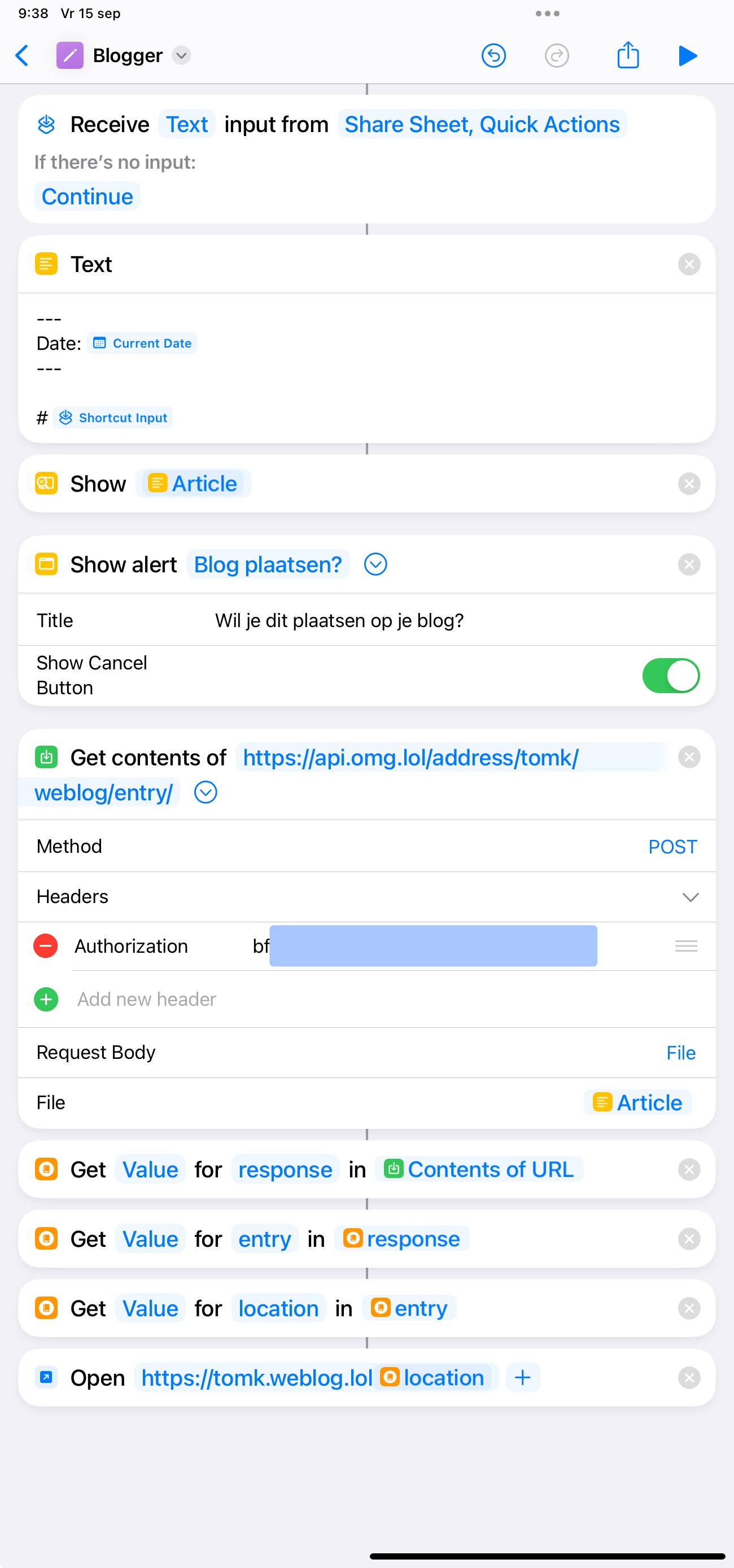
I wrote a Shortcut that lets me export a note from the Notes app to my weblog.lol blog. I’ve called it “Blogger”.
I still need a better way to use links and perhaps images, but we’ll see if I want to put in the effort to solve those. I can always just use markdown for links.
For now it works pretty well and I’m happy to have a low effort way to shoot a new post to my blog!
Hey! I'm Tom, and I was a UX designer for Soda Studio, Apple, Lightspeed, and Prss. I'm recovering from burnout and exploring what career I want to pursue. Could be tech writing, could be iOS development, could be anything outside of IT. Time will tell what makes me the happiest!
Most importantly I'm a dad and live with my autism. I love being a parent, scratching my own itches with Shortcuts and I listen to Fall Out Boy every single day. I'm stuck in 2005, music-wise.
It was 2006. I was 17, autistic, and my friends took me to a club.
People were dancing to some pretty nice songs, but that week "Mr. Brightside" by the Killers was my jam, babeh. I walked up to the DJ of the hour, I said, "man, could you play Mr. Brightside next?"
He said, "are you sure?" I said, "yeah I'm sure."
And so it went down. I heard the lead guitars and I was sure this was my time to make myself officially known as a Cool Guy.
Reception was ice cold. Dancing? Never heard of it. Even my friends looked confused. There was no other way but to endure this—really great—song with people who didn't want to hear it.